Winflector 3.9.6.8 implements test support for smard cards mapping. It can be used for signing documents using remote signature smart card available on the client computer.Winflector supports a digital signature (qualified) stored on a card with USB reader.Supported client OS: Windows and Linux.Please install the software dedicated for desired e-signature and a card reader on the Winflector application server.In most cases the same software must be installed on the client workstation.
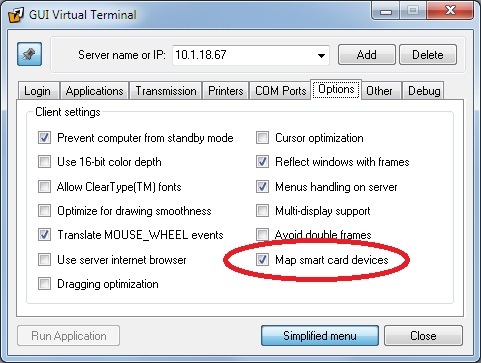
Then run Winflector client (wfc.exe) and turn on the smart card support: Advanced menu -> Options tab -> Map smart card devices (please see the attached screenshot).
Now run the desired application which use e-signature via Winflector client. When you try to sign some documents you should see the smart card inserted locally (on the client USB).
We have made basic tests with usage of e-signatures delivered by: Asseco – Certum, KIR – Szafir and Cencert. We will appreciate all tests and opinions send us to support@winflector.com.